🎯 1. Learning Objective
At the end of this lesson, the student will be able to:
- Explain what a computer is.
- Understand the basic purpose of a computer.
- Describe how computers process information.
- Identify the main functions of a computer system.
- Understand why computer knowledge is the foundation of every IT career.
🚀 2. Introduction
Today, computers are everywhere.
We use them at home, at school, at work, in hospitals, banks, transportation systems, factories, and almost every modern organization.
Many people use computers every day, but fewer people truly understand what a computer is and how it works.
An IT professional must go beyond simply using technology.
An IT professional must understand the technology itself.
That journey begins with a simple but powerful question:
❓ What Is a Computer?


💡 3. The Definition of a Computer
A computer is an electronic device that receives information, processes it according to instructions, stores data, and produces results.
In simple words:
A computer is a machine that can:
⌨️ Receive Information
This is called Input.
Examples:
- ⌨️ Keyboard.
- 🖱️ Mouse.
- 🎙️ Microphone.
- 📷 Camera.
- 📠 Scanner.
⚙️ Process Information
This is the work performed by the computer’s processor.
The computer analyzes instructions and performs calculations.
The main component responsible for this is the:
🧠 CPU (Central Processing Unit).
💾 Store Information
Computers need a place to keep information.
Examples:
- 💽 HDD (Hard Disk Drive).
- ⚡ SSD (Solid State Drive).
- 🔌 USB drives.
- 💳 Memory cards.
- ☁️ Cloud storage.
🖥️ Produce Information
This is called Output.
Examples:
- 🖥️ Monitor.
- 🖨️ Printer.
- 🔊 Speakers.
- 📽️ Projector.


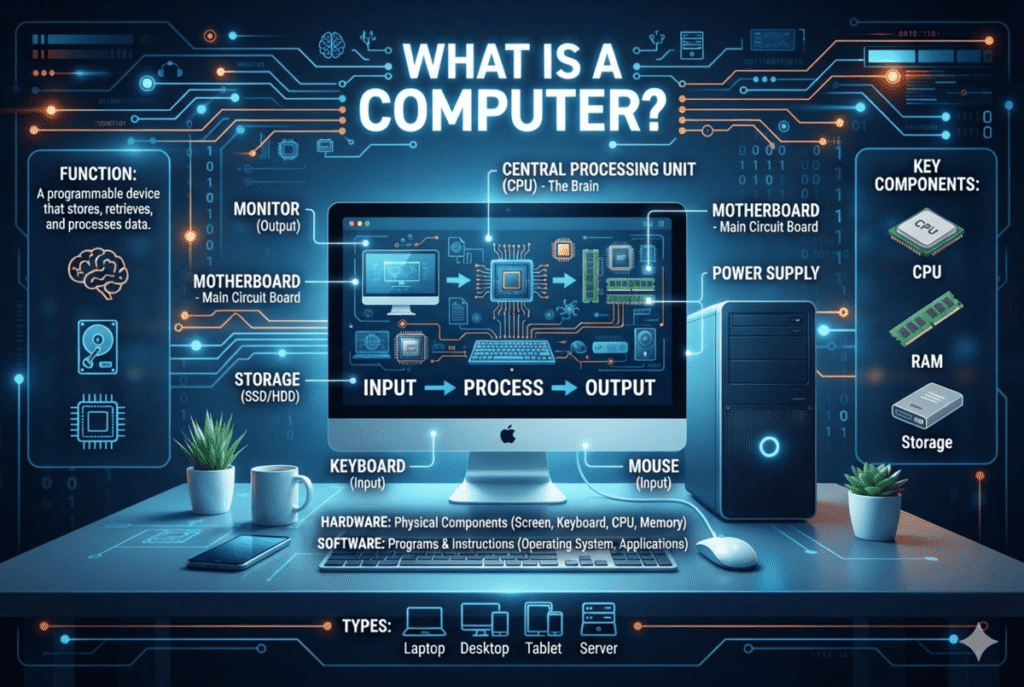
The four basic functions illustrated above form one of the most important concepts in computer fundamentals:
Input → Processing → Output → Storage
🧩 4. The Computer System Concept
A common mistake is thinking:
“A computer is only the physical machine.”
That is incomplete.
A computer system is made of several elements working together.
A complete computer system includes:
🔩 Hardware
The physical parts that we can touch.
Examples:
- 🧠 Processor.
- 🧮 RAM memory.
- 🔧 Motherboard.
- 💾 Storage devices.
- 🖥️ Monitor.
- ⌨️ Keyboard.


💿 Software
The programs and instructions that tell the hardware what to do.
Examples:
- 🪟 Windows.
- 🐧 Linux.
- 📝 Microsoft Word.
- 🌐 Web browsers.
- 📱 Applications.
📊 Data
The information that computers process.
Examples:
- 📄 Documents.
- 📷 Photos.
- 🎬 Videos.
- 🔢 Numbers.
- 💬 Messages.
👤 Users
The people who interact with the computer.
A computer without instructions and users cannot provide useful results.
🔄 5. How Does a Computer Work?
A computer follows a basic cycle:
⌨️ Input → ⚙️ Processing → 🖥️ Output → 💾 Storage
Let’s see an example.
Imagine writing a document.
⌨️ Step 1 — Input
You press keys on the keyboard.
The computer receives your instructions.
⚙️ Step 2 — Processing
The CPU processes the information.
It communicates with memory and other components.
🖥️ Step 3 — Output
The document appears on your monitor.
💾 Step 4 — Storage
You save the document on your SSD, HDD, or cloud storage.
This simple cycle happens millions of times every second inside modern computers.


🌎 6. Computers Are Everywhere
A computer is not only a desktop or laptop.
There are many types of computers.


🖥️ Desktop Computers
Used in:
- 🏠 Homes.
- 🏢 Offices.
- 🏫 Schools.
- 🏪 Businesses.
✅ Advantages:
- 🔧 Easy to upgrade.
- ⚡ Powerful.
- 💼 Good for professional work.
💻 Laptop Computers
Portable computers with:
- 🖥️ Screen.
- ⌨️ Keyboard.
- 🔋 Battery.
- 🔧 Internal components.
Used by:
- 🎓 Students.
- 👨💼 Professionals.
- ✈️ Travelers.
📱 Smartphones
Modern smartphones are powerful computers.
They contain:
- 🧠 CPU.
- 🧮 RAM.
- 💾 Storage.
- ⚙️ Operating system.
🖧 Servers
Special computers designed to provide services to other computers.
Examples:
- 🌐 Websites.
- 🗄️ Databases.
- 💼 Business applications.
🤖 Embedded Computers
Small computers integrated into devices.
Examples:
- 🚗 Cars.
- 📺 Smart TVs.
- 🏥 Medical equipment.
- 🏭 Industrial machines.
👨💻 7. Why Is This Important for an IT Professional?
An IT professional does not only know how to click icons or open applications.
An IT professional understands:
- 🔧 how computers are built;
- 🔗 how components communicate;
- 💿 how software controls hardware;
- ⚠️ how problems occur;
- 🛠️ how problems can be solved.
This foundation will help you later understand:
- 🖥️ computer repair;
- 🌐 networking;
- 🔐 cybersecurity;
- 💻 programming;
- ☁️ cloud computing;
- 🤖 artificial intelligence.


🧪 8. Practical Activity
🔎 Activity 1
Look at your own computer.
Write down:
- 🏷️ Brand and model.
- ⚙️ Operating system.
- 💾 Storage capacity.
- 🧮 Available memory (RAM).
- 📱 Programs you use frequently.
🔍 Activity 2
Identify examples of:
⌨️ Input Devices
Write at least three.
🖥️ Output Devices
Write at least three.
💾 Storage Devices
Write at least three.
🎯 9. Mission 1
🕵️ “Know Your Computer”
Your mission:
Become familiar with the computer you own.
Complete these steps:
- 🔎 Find the computer manufacturer.
- 🪟 Find your Windows version.
- 💾 Find your storage capacity.
- 🧮 Find your RAM amount.
- 📝 Take notes about your discoveries.
Do not worry if some information is difficult to find.
The goal is not only the answer.
The goal is learning how to investigate.
That is a professional IT skill.
✅ 10. Skills Checklist
Before completing this lesson, you should be able to answer:
☐ ❓ What is a computer?
☐ 🔄 What are the four basic functions of a computer?
☐ 🧩 What is the difference between hardware and software?
☐ 🧠 What is the role of the CPU?
☐ ⌨️ What is input?
☐ 🖥️ What is output?
☐ 💾 What is storage?
☐ 🌎 Name different types of computers.
📝 11. Knowledge Evaluation
Answer the following questions:
❓ Question 1
What are the four basic functions of a computer?
❓ Question 2
Explain the difference between hardware and software.
❓ Question 3
Is a smartphone a computer? Explain why.
❓ Question 4
Why does an IT professional need to understand computer fundamentals?
❓ Question 5
What happens when you save a file?
❓ Question 6
What is the role of the CPU in a computer system?
❓ Question 7
Give two examples of input devices and explain what information each one provides to the computer.
❓ Question 8
Give two examples of output devices and explain how each one communicates information to the user.
❓ Question 9
Imagine that you are working on a document and suddenly the computer loses power before you save it. What type of computer function is involved in this situation, and why might your work be lost?
❓ Question 10
A company has desktop computers, laptops, smartphones, and servers. Are all of these considered computers? Explain what they have in common as computer systems.
💭 12. Final Reflection
Learning technology is a journey.
Every expert in IT, cybersecurity, programming, networking, or artificial intelligence started with a simple question:
“How does this work?”
The curiosity to understand is the beginning of every technological career.
Today you have taken your first step.
🏁 End of Lesson 1
Professional IT Foundations
Level I — Digital Foundations